The Embeddable, Lossless Terminal Engine in Rust & Swift
Engineered to provide a high-fidelity, embeddable VT backend. Features deterministic snapshot serialization, configurable scrollback ringbuffers, and native 120 FPS Metal rendering across macOS, iOS, and server runtimes.
brew install --cask alex09x/apps/tako ╭ tako git:(main*) ~2 ?2 · 3.0s · ✗ 1
╰ ❯ cargo run --example terminal_session
[00:00:00.001] INIT TakoCore Engine instantiated (scrollback capacity: 10,000 lines)
[00:00:00.003] METAL CAMetalLayer pipeline initialized: 120Hz display sync
[00:00:00.005] VT100 SGR mouse tracking & 24-bit TrueColor enabled
┌─── TakoCore Terminal State ──────────────────────────────────────────┐
│ Columns: 120 Rows: 36 Active Screen: Primary Cursor: [14, 2] │
│ Draw calls / frame: 1 instanced Metal │
│ Queued host events: 0 pending (host event-drained) │
└──────────────────────────────────────────────────────────────────────┘
╭ tako git:(main)
╰ ❯ echo -e "\e[38;2;244;88;28mLossless checkpointing, configurable scrollback bounds.\e[0m"
Lossless checkpointing, configurable scrollback bounds.
╰ ❯ █
Designed for Apple Silicon
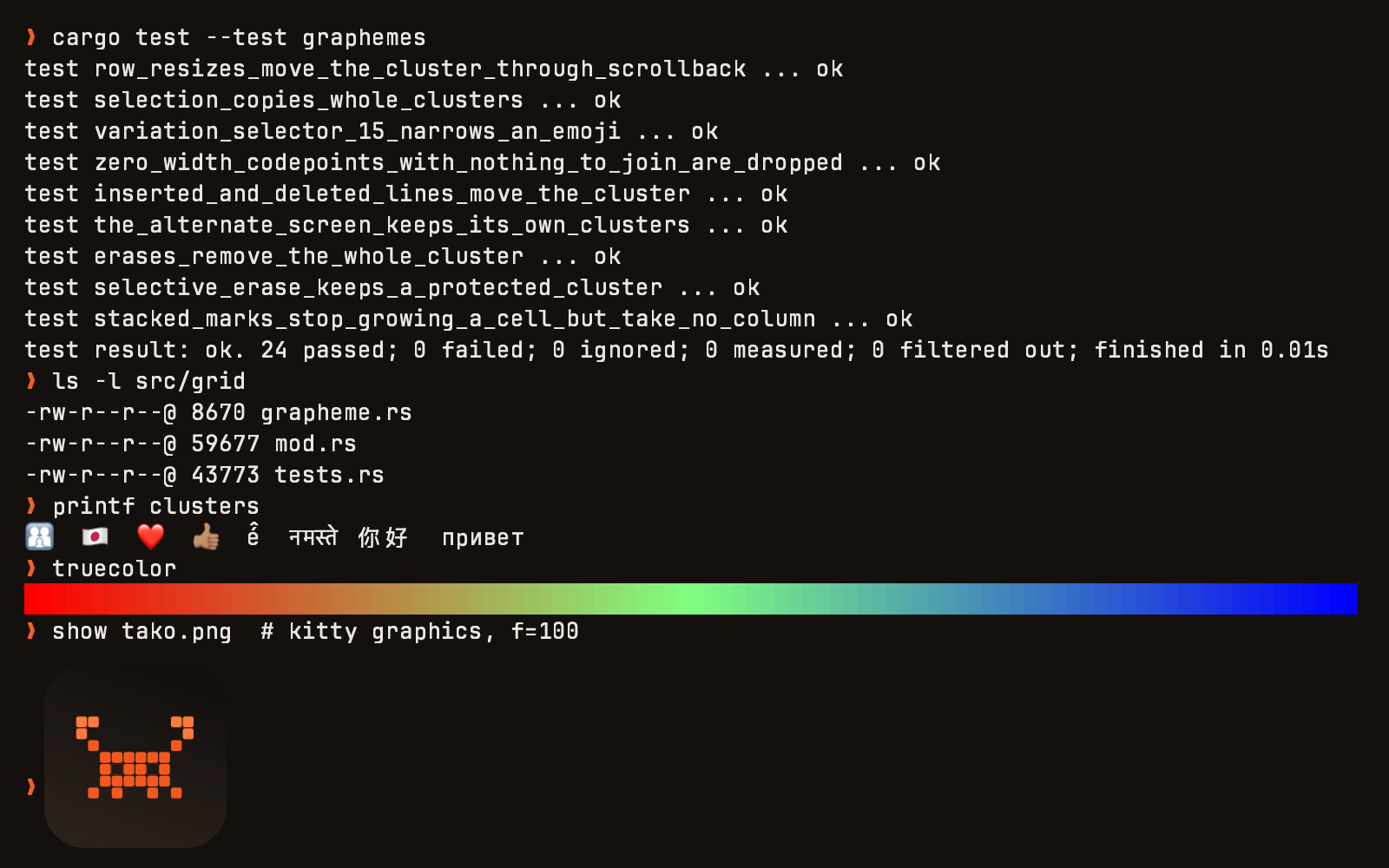
Beyond the core headless Rust engine, TakoCore includes a full native AppKit/UIKit UI layer. Metal shaders, CoreText glyph caching, and frictionless macOS integration.
Pick Up Where You Left Off
Each tab's screen and scrollback come back after a relaunch, marked with when they were saved. A new shell is never passed off as the old one.
Find in All Tabs
Cmd+Shift+F searches every open terminal's history and jumps to the match. Where the shell marks its commands, matches are grouped by the command that printed them, with the exit status and directory the shell reported and the start time Tako recorded.
Know When a Command Ends
A long command that finishes or fails while you are elsewhere marks its tab and can notify you. The state comes from shell integration and exit codes, never from guessing at screen text.
Native Dictation Support
Seamless macOS voice input integration through full NSTextInputContext lifecycle and text-input handling.
Kinetic Touch Scrolling
Smooth momentum scrolling with precise alternate-screen scroll wheel emulation for vim, less, and tmux.
Cyrillic & Dead-Key Parity
Consistent physical keycode handling ensuring shortcuts like Ctrl+C and modifier sequences operate reliably across non-Latin layouts.
Built for Mission-Critical Terminal Runtimes
Legacy terminal libraries suffer from memory fragmentation, snapshot drift, and crash bugs in high-throughput environments. TakoCore was re-architected from the ground up.
Memory-Safe Rust Engine
Built on Rust's type and memory safety guarantees to prevent memory corruption. Terminal scrollback history is constrained by configurable line limits, while host integrators drain or discard queued events (such as via prod_vt_discard_events()) to prevent retained parser payloads from accumulating in memory.
Lossless State Checkpointing
Instantly serialize the entire active grid, scrollback buffer, cursor coordinates, and active terminal modes into a compact wire format and restore with 0 byte drift.
Metal GPU Pipeline (120 FPS)
Hardware-accelerated glyph caching and instanced batch rendering via Apple Metal on macOS and iOS, delivering buttery-smooth 120Hz ProMotion updates.
AppKit & UIKit Native UI
Ready-to-use TakoTerminalNSView supporting full NSTextInputClient, IME, CJK, dead keys, macOS keyboard Dictation, and kinetic trackpad gestures.
Universal C ABI
Dead-simple integration with Go, Zig, C, and Python backends. Includes prod_vt_discard_events() for host servers that intentionally drain event notifications.
Modern Terminal Specs
Full support for 24-bit TrueColor, SGR extended coordinates, OSC 8 clickable URLs, bracketed paste mode, alternate screen buffers, and Unicode grapheme clustering.
Layered, High-Throughput Architecture
TakoCore cleanly separates stream decoding, grid mutation, lossless checkpointing, and GPU drawing into deterministic, decoupled layers.
macOS Desktop
iOS Native
Headless PTY Server
TakoCoreUI (Swift) TakoTerminalNSView • NSTextInputClient • Mouse/Keyboard delegate
TakoCore C ABI prod_vt_new() • prod_vt_write() • prod_vt_discard_events()
 TAKO CORE (Rust Engine)
SIMD-accelerated UTF-8 stream decoder
Configurable scrollback ring buffer
Lossless delta & palette serialization
120Hz GPU texture atlas
Engine Performance & Workload Benchmarks
Measured in-process throughput of the Rust VT parser and grid data structures using Criterion on Apple Silicon. Cross-product whole-app comparisons are unverified without a standardized external test harness and are qualified or omitted below.
SGR Styled Throughput
24-bit truecolor & ANSI SGR parser throughput (feed/sgr_heavy)
Unicode & CJK Throughput
Double-width characters & emoji bookkeeping (feed/wide_chars)
Soft-Wrap Reflow
Buffer reflow resizing 80 cols to 40 cols (resize/reflow_80_to_40)
Circular Line Scroll
Row rotation without scrollback allocation (grid/scroll_up, no_scrollback)
Engine Ingestion Throughput
Higher is faster (MiB/s)Criterion micro-benchmarks feeding continuous byte patterns into an 80×24 terminal on Apple Silicon (M-series, Darwin). Measured in-process using 256 KiB batch buffers.
Measurement Scope & Boundaries
Scope Notice✓ In-Process Engine Benchmarks (Verified)
The engine workload metrics above and in the breakdown table reflect direct Criterion micro-benchmarks on the pure Rust VT parser and grid memory structures (benches/throughput.rs). They are reproducible by cloning the repository and running cargo bench.
⚠ Cross-Product Whole-App Comparisons (Unverified / Omitted)
Comparative whole-app benchmarks (evaluating end-to-end PTY throughput, window compositor synchronization, and competitor memory footprints across terminal apps like Alacritty, Ghostty, or iTerm2) require a standardized multi-app measurement harness, version matrices, and published raw test artifacts. Because no third-party execution harness is bundled in the repository, cross-product speedup rankings and competitor timings are omitted to adhere strictly to verifiable data.
Engine Workload Breakdown (benches/throughput.rs)
Criterion micro-benchmarks feeding continuous byte patterns into an 80×24 terminal on Apple Silicon M-series:
| Benchmark Workload | Measured Throughput | Real-World Representation |
|---|---|---|
| feed/sgr_heavy | 29 MiB/s | Heavily styled compiler output, `ls --color`, RGB 24-bit truecolor logs |
| feed/wide_chars | 17 MiB/s | CJK double-width characters, emojis, and combined glyph pair bookkeeping |
| feed/plain_text | 11 MiB/s | Raw unformatted ASCII streaming directly into the active grid ringbuffer |
| feed/cursor_heavy | 8 MiB/s | Interactive full-screen TUI repaints (`htop`, `neovim`, `lazygit`, curses) |
| resize/reflow_80_to_40 | 227 µs | Full soft-wrapped text reflow upon window resize without dropping wrapped history |
| grid/scroll_up_1_line_97x30 (no_scrollback) | < 1 µs / line | Row-circular line advance isolating row rotation without scrollback allocation (capacity 0; with_scrollback retains lines in history) |
| feed/scrollback_10k_lines | Active Ringbuffer | Continuous scrollback pressure under 512 KiB batch stream into 10,000-line capacity |
Architectural Design Matrix
Design architecture of TakoCore compared against other modern terminal systems across core architectural areas:
| Design Dimension | TakoCore (v0.1.3) | Ghostty (Zig) | Alacritty (Rust) | iTerm2 (Obj-C) |
|---|---|---|---|---|
| Core Architecture | Embeddable Rust library + Swift/Metal UI | Zig monolithic binary + Swift shell | Rust monolithic app | Objective-C application |
| Session State Model | Structured binary checkpoint wire format | Ephemeral process state | Ephemeral process state | Cocoa window/tab restoration |
| macOS Keyboard & Input | Native NSTextInputClient & macOS input integration | Custom C-bridge to AppKit input methods | winit / Cocoa IME integration | Native Cocoa NSTextInputClient |
| Memory Management | Configurable scrollback ringbuffer; host-drained event queue | Configurable scrollback ringbuffer | Configurable scrollback ringbuffer | Configurable scrollback buffer |
| Graphics Pipeline | CAMetalLayer with ProMotion (120 Hz) | Metal / OpenGL with high-refresh display support | OpenGL (VSync display synchronization) | Metal / Quartz graphics pipeline |
Note: Architectural comparisons are based on documented project architecture and repository source code. Cross-product performance and memory benchmarks require dedicated multi-app test harnesses and are not asserted here.
Reproducing the Engine Benchmarks
The engine workload suite benchmarks the in-process Rust VT parser and grid structures using Criterion. You can execute it directly on your machine:
git clone https://github.com/alex09x/tako && cd tako
cargo bench --bench throughput
The Criterion suite tests the standalone Rust engine (tako_core in-memory parsing and grid data structures). It does not measure end-to-end PTY streaming, display server compositing, or competitor desktop applications, which require a separate whole-app benchmark harness. Benchmark source code is tracked in benches/throughput.rs.
Get Started with Tako & TakoCore
Install the ready-to-run desktop terminal app Tako via Homebrew Cask or DMG, or embed the TakoCore engine directly into your own applications using SwiftPM, Cargo, or C ABI.
# Install Tako.app and the CLI wrapper via Homebrew
# 1. Add personal Homebrew tap
brew tap alex09x/apps

# 2. Install Tako macOS App & CLI symlink
brew install --cask tako

# Or install in a single command:
brew install --cask alex09x/apps/tako

# Run Tako from anywhere
takoLatest Stable Release (v0.1.7)
Official release builds include the standalone Tako macOS desktop application and multi-platform TakoCore XCFramework archives for macOS and iOS. Fully signed and notarized by Apple.
Tako & TakoCore v0.1.7
LatestGit Revision: 15d6e89
6c5dfebccb85767c2ba057d26de9c6ebebd46e717039ed258b67eb1d4978008f
e96a513a4a02cf0fdd488b77b5dd3dc8cd56c449c659bb18d1b133ba5b16b621
Release Highlights (v0.1.7):
- In-App Updater Auto-Relaunch: Interactive terminal dialog («Relaunch Now» / «Keep Working») and instant restart directly into the newly installed release without manual steps.
- On-Launch What's New Notice: Terminal-style announcement card in the TakoCore palette showcasing the active running version and release highlights on first start.
- Top-Bar About & Quick Controls: Dedicated About/Info button (
[ ⓘ ]) in the window header across both multi-tab and single-window (lone) modes for instant access to version info, build commit, and documentation. - Zero-Privilege Native CLI Installation: Removed AppleScript and
osascriptprivilege escalation completely.takoctlinstallation uses direct POSIX system calls (symlink,rename,mkdir) supporting user paths (~/.local/bin,~/bin, Homebrew) without password prompts. - Native CALayer Interactive Scrollbar: Always-on overlay scrollbar rendered over Metal surfaces, with track hover, direct mouse dragging, click-to-jump, and alternate screen multiplexer session support (
zmx/ DEC 1007). Completely inert on empty scrollback.